
Acknowledging and closing entry types is an easy way to be able to monitor & action activities regarding your service users. It allows the author to know when things happen in real time & whenever a new entry is created you can access this, let someone know that it has been read or tick something off your ‘to-do’ list by closing.
First you need to access the dashboard. This is the very first screen that appears when you log in.
When viewing the dashboard - you will be able to see at a glance if there have been any new entries made.

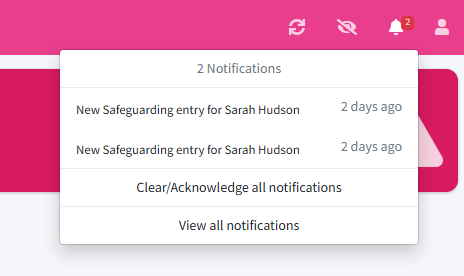
Another way to view if an entry has been created is by accessing your notifications, by clicking the notification bell in the top right hand corner of the dashboard.
For the purpose of this example - we will access the new entry by clicking the ‘2 new’ button within the ‘behaviour’ box. This will show all service users in the category.

You will then see that next to the service user in question under ‘status’ that the ‘NEW’ tag has appeared. This will help you identify which service user has the new entry type attached to them.
Click ‘green eye symbol’ within ‘Actions’ and this will take you to the information in the chronology.

Once in the chronology - you will be able to see which entry is the newest as it will appear at or near the top of the chronology with the ‘NEW’ tag in red.

In order to acknowledge that the new entry has been seen - click the green ‘Acknowledge’ button. This will then show a real time marker of who has acknowledged this entry with the date and time.
Once you have done this - the box will then change from ‘acknowledge’ to ‘close’. Click this to close the entry.
A ‘Closed by’ entry will then show next to ‘Acknowledged by’ with a real time date and time marker.
Once completed - it will update on the dashboard which you can access by clicking ‘Dashboard’ in the top left hand corner of the screen.
You can then view the same category to show that your entry has been acknowledged and closed.