
You can share chronologies externally with people such as social workers and other external agencies. It’s also useful when transferring information to new organisations when people move somewhere new.
When viewing a person, the menu across the top has a ‘Share’ option.

Click ‘Share’
You can then enter the e-mail address, choose which chronology you would like to share or any combination of chronologies. You can also add a personal message or additional details.
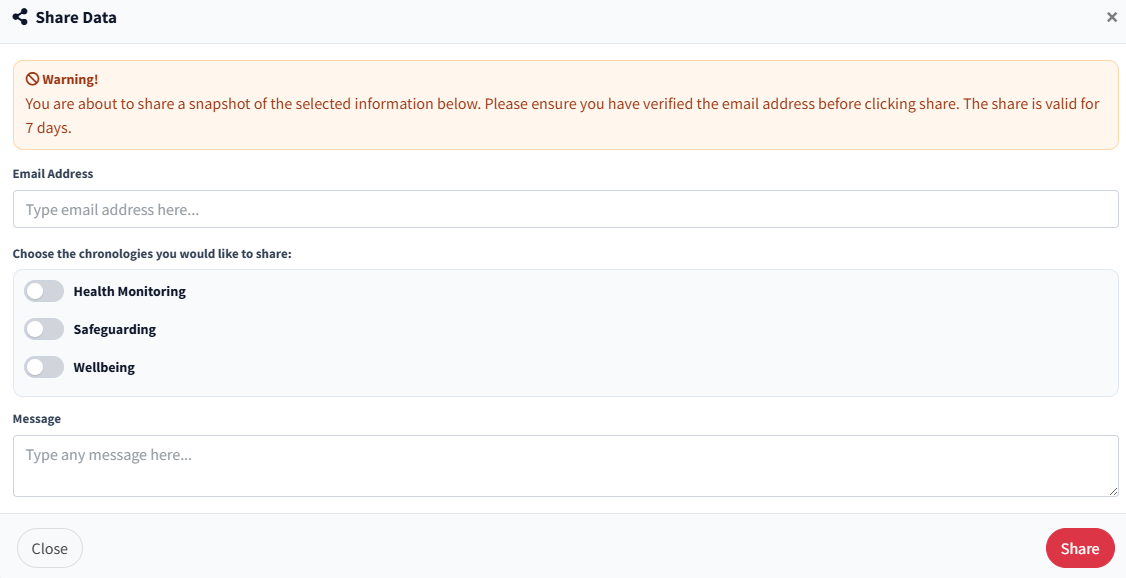
When you’re ready, press ‘Share’. This will give the other person secure access to view and download the information. You will see when they have accessed this too.
You will see the request in the sharing menu on the left hand side of RecordMy.

You can also see when the record has been downloaded and when it expires. There is also an option to view a receipt which contains all the details about the shared information.
For details on the process for the external party, see Open information shared with me